
CSS: Text alignment
A strong way to highlight a section of text is to align it differently from the rest of the text. Many sites align the header to the center so that the user can distinguish it more quickly.
<p class="text-center h3">Centered header</p>
<p>Page text. You can see that the header jumps out more since it's centered</p>
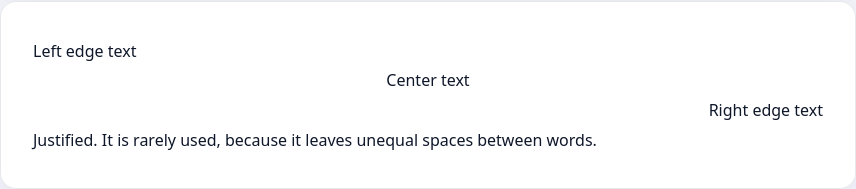
CSS allows you to align text using the text-align property with 4 basic values:
left. This one is used by defaultcenterrightjustify
<p class="left">Left edge text</p>
<p class="center">Center text</p>
<p class="right">Right edge text</p>
<p class="justify">Justified. It is rarely used, because it leaves unequal spaces between words</p>.left {
text-align: left;
}
.center {
text-align: center;
}
.right {
text-align: right;
}
.justify {
text-align: justify;
}
Instructions
Add a paragraph with the class important to the editor and center it. Write the styles in the <style> tag.
Tips
The most familiar option to most people's eyes is left alignment. Try not to use too many different alignments on one page
If you've reached a deadlock it's time to ask your question in the «Discussions». How ask a question correctly:
- Be sure to attach the test output, without it it's almost impossible to figure out what went wrong, even if you show your code. It's complicated for developers to execute code in their heads, but having a mistake before their eyes most probably will be helpful.
CSS: Text alignment
A strong way to highlight a section of text is to align it differently from the rest of the text. Many sites align the header to the center so that the user can distinguish it more quickly.
<p class="text-center h3">Centered header</p>
<p>Page text. You can see that the header jumps out more since it's centered</p>
CSS allows you to align text using the text-align property with 4 basic values:
left. This one is used by defaultcenterrightjustify
<p class="left">Left edge text</p>
<p class="center">Center text</p>
<p class="right">Right edge text</p>
<p class="justify">Justified. It is rarely used, because it leaves unequal spaces between words</p>.left {
text-align: left;
}
.center {
text-align: center;
}
.right {
text-align: right;
}
.justify {
text-align: justify;
}
Instructions
Add a paragraph with the class important to the editor and center it. Write the styles in the <style> tag.
Tips
The most familiar option to most people's eyes is left alignment. Try not to use too many different alignments on one page
If you've reached a deadlock it's time to ask your question in the «Discussions». How ask a question correctly:
- Be sure to attach the test output, without it it's almost impossible to figure out what went wrong, even if you show your code. It's complicated for developers to execute code in their heads, but having a mistake before their eyes most probably will be helpful.
Your exercise will be checked with these tests:
const { test } = require('tests');

test(({ query, expect }) => {
  const element = query(document, 'p');
  expect(element).to.have.class('important');

  const style = getComputedStyle(element);
  expect(style).to.have.property('text-align', 'center');
});Teacher's solution will be available in:
20:00
