
HTML: Paragraphs
Paragraphs are the main way to divide a large text into small logical blocks. These blocks are automatically "indented" from each other. Such text is much easier to read and does not scare users.
Paragraphs are mostly found within large text. For example, any lesson on Hexlet or Code Basics is broken up into paragraphs for easy reading, just like this one.
It is broken down into small blocks of meaning. Not only is it more comfortable to read, but you can quickly find the information you need in a large text.
Paragraphs are created using the paired <p> tag with a small amount of text in the body. For example:
<p>First paragraph</p>
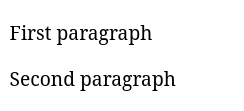
<p>Second paragraph</p>This is what they look like in the browser:
Instructions
Wrap the phrase Hello, World in a paragraph tag
Tips
Paragraphs cannot be nested within each other
If you've reached a deadlock it's time to ask your question in the «Discussions». How ask a question correctly:
- Be sure to attach the test output, without it it's almost impossible to figure out what went wrong, even if you show your code. It's complicated for developers to execute code in their heads, but having a mistake before their eyes most probably will be helpful.
HTML: Paragraphs
Paragraphs are the main way to divide a large text into small logical blocks. These blocks are automatically "indented" from each other. Such text is much easier to read and does not scare users.
Paragraphs are mostly found within large text. For example, any lesson on Hexlet or Code Basics is broken up into paragraphs for easy reading, just like this one.
It is broken down into small blocks of meaning. Not only is it more comfortable to read, but you can quickly find the information you need in a large text.
Paragraphs are created using the paired <p> tag with a small amount of text in the body. For example:
<p>First paragraph</p>
<p>Second paragraph</p>This is what they look like in the browser:
Instructions
Wrap the phrase Hello, World in a paragraph tag
Tips
Paragraphs cannot be nested within each other
If you've reached a deadlock it's time to ask your question in the «Discussions». How ask a question correctly:
- Be sure to attach the test output, without it it's almost impossible to figure out what went wrong, even if you show your code. It's complicated for developers to execute code in their heads, but having a mistake before their eyes most probably will be helpful.
Your exercise will be checked with these tests:
const { test } = require('tests');

test(({ query, expect }) => {
  const element = query(document, 'p', HTMLParagraphElement);
  expect(element).to.contain.text('Hello, World');
});Teacher's solution will be available in:
20:00
